First Steps in KDE Contribution
Motivation
At this point in the course, we were given several options to contribute to Linux-related projects, such as the Linux Kernel, GNOME, Git, and kw. However, my partner, Francisco, proposed that we work on KDE, which is functionally quite similar to GNOME. I wasn’t very familiar with KDE, but I was curious to learn more about it, so we decided to give it a try.
First Approach
Our first objective was to find a beginner-friendly issue to work on. We started by exploring the Get Involved page, where we found many useful links, including their internal chat, project repositories, bug tracker, and guidelines for new contributors.
Once we signed up for Matrix, their internal chat platform, we asked in the new contributors channel if there were any beginner-friendly issues to work on. We were directed to the Bugzilla page and the Junior Job filtered GitLab issues page. We didn’t find any good, recent, and small issues on GitLab, but we found some interesting ones on Bugzilla.
Since I had never used KDE before, I installed it on my computer to familiarize myself with the environment. I found it to be a very nice desktop environment—quite similar to Windows, but for Linux.
The Task
Reported in February 2025, the initial issue we chose was a bug in the Spectacle application, which is KDE’s screenshot tool. The bug was that the application didn’t remember the window size from the last time the user opened it. Bug page: 499652
Setup of the Environment
Next, we needed to reproduce the bug using the latest version from the repository.
We started by checking the documentation to find instructions on how to build the project. The Getting Started guide was very helpful, providing each command and handling corner cases for setting up the environment. Using kde-builder, downloading and compiling Spectacle was straightforward—except that I had to manually install a few dependencies.
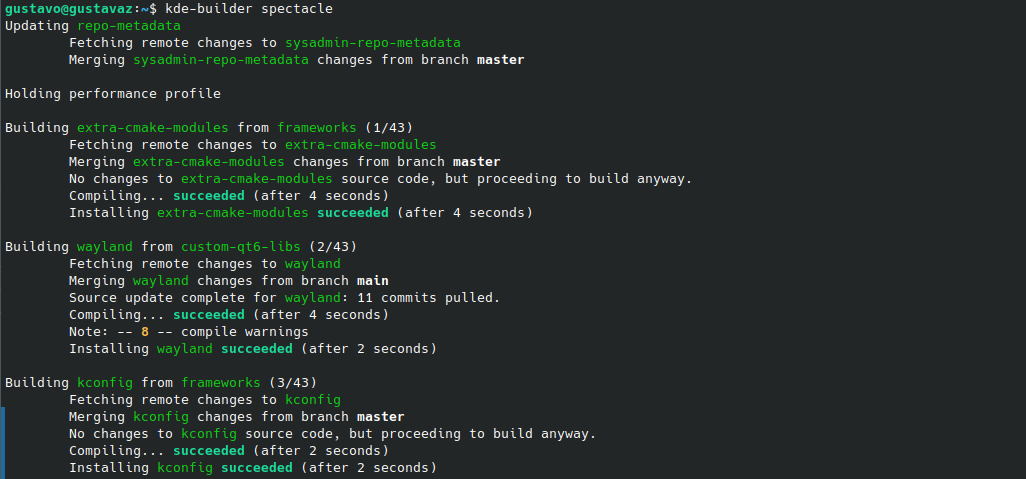
A popular graphic interface framework for Linux is Qt, which is used by KDE. during the compilation, we had several problems with it. Our version was no compatible, so we had to install the Qt 6.9.0 version directly from its website and manually set some options necessary to compile the Spectacle. Other dependencies were also missing, but the error messages were very clear, so we could easily install them by sudo apt install <dependency> or directly from the repository, like I did for wayland-protocols.
Trying to Run
The kde-builder can also run the application, and it’s recommended to use it because it sets up the environment and dependencies automatically. The command used: kde-builder --run spectacle
However, we encountered some problems. The output was:
1
2
3
4
5
6
kf.kirigami.platform: Failed to find a Kirigami platform plugin for style "Fusion"
KWin screenshot request failed:
The process is not authorized to take a screenshot
Potentially relevant information:
- Method: CaptureScreen
- Method specific arguments: "eDP"
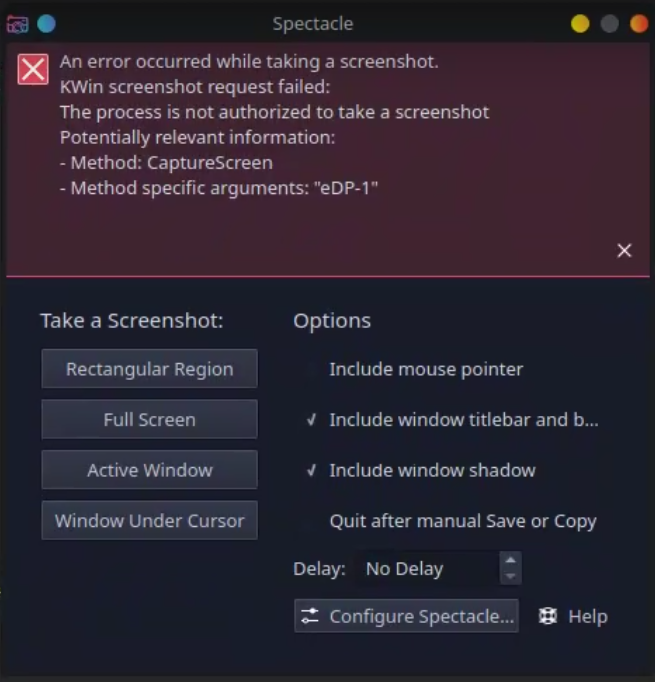
This indicated a permissions problem, but resolving it was difficult because running kde-builder with sudo does not work.
Looking for the solution
After some research, we found forum posts describing the same issue. It appears to be a problem in the new Plasma version as well, but the solutions shared on the forums didn’t work for us. We tried asking for help in the KDE Development chat, but the response wasn’t very helpful.
The last thing I did was try to identify the maintainer of Spectacle by looking at who approves merge requests. I found the maintainer, but before reaching out for help, we want to make sure we’ve tried everything we can.